Thursday, 18 February 2016

Microsoft's Translator app plays catch-up with Google - CNET


Screenshot by Lance Whitney/CNET

Microsoft has a couple new tricks up its sleeve to help it better compete with Google Translate.

Wednesday, 10 February 2016

Get 2GB of Google Drive space for free (again!)


Want to earn an extra 2GB of storage space on Google Drive for 2 minutes of your time? Read on to find out how.


Same as last year, Google is now offering an additional 2GB of Drive storage for users who complete the Account Security Checkup, in honor of Safer Internet Day. This year, you only have until February 11, 2016, to complete the checkup.

Right now users can do the same checkup (it's been spruced up a bit) and receive 2GB of space in addition to any previous offers you've obtained on Google Drive. So if you're interested, act fast.


To get started, head to the Security Checkup tool that Google provides for your account. You'll need to verify your backup information, including phone number, recovery email address and backup security question. These fields must be filled out for this portion of the security checkup to be considered complete


Recent activity on your Google account.Screenshot by Nicole Cozma/CNET

Now you'll be able to check your connected devices that have recently signed-in to your account. If you have any mobile devices attached to your Google account, you will see them in this list. If something looks wrong, you'll be prompted to change the password on your account to make sure the device in question can no longer connect.


Google account permissions.Screenshot by Nicole Cozma/CNET

This next section might be a long one if you've used Google to log in to many devices or websites. Each device and site will be listed with a Remove button to the right, allowing you to cancel access right now. You can always come back to this at a later time if you change devices or no longer want to use a specific website/service. This is the end of the security checkup if you are not using two-step authentication.


App-specific passwords.Screenshot by Nicole Cozma/CNET

If you are using two-step authentication on your account, you may notice that some devices do not support the authentication code. For these, you would have used an application-specific password. This section allows you to revoke any of the devices you no longer want on your account.


Two-step verification settings.Screenshot by Nicole Cozma/CNET

The final section of the security checkup includes your 2-step verification settings, which should include a backup phone number and backup codes. The phone number will help you work out access to your account with Google if you lose other methods of logging in, and the backup codes serve as one-use passwords if you lose the authenticator.


After finishing, you'll see a "Nicely done" page load, with the message that 2 GB of Drive space will be awarded to your account to celebrate Safer Internet Day. So hurry, and grab your free gigs now!

Via CNET

Friday, 5 February 2016

Facebook-owned WhatsApp boasts of billion users

Facebook-owned WhatsApp boasts of billion users

Facebook-owned smartphone messaging service WhatsApp has hit the billion-user mark, according to the leading social network’s chief and co-founder Mark Zuckerberg.
“One billion people now use WhatsApp,” Zuckerberg said in a post on his Facebook page.
“There are only a few services that connect more than a billion people.”
Google’s free email service, Gmail, is the latest of the Internet giant’s offerings to crest the billion-user mark, chief Sundar Pichai said Monday during an earnings call.
The ranks of people using WhatsApp have more than doubled since California-based Facebook bought the service for $19 billion in late 2014, according to Zuckerberg.
“That’s nearly one-in-seven people on Earth who use WhatsApp each month to stay in touch with their loved ones, their friends and their family,” the WhatsApp team said in a blog post.
After buying WhatsApp, Facebook made the service completely free. The next step, according to Zuckerberg, is to make it easier to use the service to communicate with businesses.
Weaving WhatsApp into exchanges between businesses and customers has the potential to create revenue opportunity for Facebook.
Recent media reports have indicated that Facebook is working behind the scenes to integrate WhatsApp more snugly into the world’s leading social network by providing the ability to share information between the services.
Via OmniGhana

Monday, 30 November 2015

Amazon Delivery Drone Can Travel 15 Miles


Amazon's new delivery drone is a cross between a plane and a helicopter, and can avoid obstacles to drop off packages.

Amazon has unveiled a new hybrid delivery drone that can travel up to 15 miles at high speed.

In a new video released by the online retail giant, one of its drones is seen landing on a designated spot in someone's back garden.

A flap underneath the drone opens up, and a package is deposited on the lawn.

Amazon says the drone can fly around obstacles thanks to built-in safety features - an attempt to appease regulators who are generally resistant to the idea of drone delivery.


Read full article @ Sky

Saturday, 28 November 2015

LG Investment Adds New Fuel to Reports That Apple Is Planning an OLED iPhone


Remember all the recent reports saying that while the iPhone 7 won’t have an OLED display, it’s likely that Apple will come out with an OLED iPhone by 2018?

Now, there’s one more hint that Apple’s iPhone is about to go OLED when it comes to screen technology

LG confirmed that it will invest no less than $8.4 billion in a new OLED plant that seems to suggest the Korean giant is preparing for a big boost in demand for OLED displays.


Read Full Article Here

HOW TO TURN ON WINDOWS 10'S FIND MY DEVICE FEATURE

Microsoft’s Windows 10 November update brings with it a handy “find my device” feature, but it’s not just for tablets or phones. Any Windows 10 device can take advantage of the new feature, including desktops and laptops.

Find My Device in Windows 10 doesn’t do a whole lot right now. There isn’t a way to have your tablet make a sound, lock itself, erase data, or anything like that. Instead, you can only find out where its last known general location was.


Nevertheless, if you want to try this feature out here’s how to turn it on.


Find My Device is buried under Settings > Update & Security.


To active this feature go to Start > Update & Security > Find My Device.


On this screen you’ll see a big Change button under the heading “Find My Device is off.”


Turn this slider to On and you’re done.


Once you click Change you’ll see a pop-up panel that says “Save my device’s location periodically.” Turn the slider to On and you’re done.


Find My Device is now on.


You should now see that the Find My Device screen has changed to “Find My Device is on” as seen above.

To make sure everything is working, login to account.microsoft.com/devices with your Microsoft account and you should see the name of your PC listed under “Your devices.”

If you don’t know the name of your device, right-click on the Start button and selectSystem. In the Control Panel window that opens you’ll see it under “Computer name.”


This story, "How to turn on Windows 10's Find My Device feature" was originally published by PCWorld.


Credit: IT News

Monday, 2 November 2015

George Boole’s 200th Birthday

George Boole’s 200th Birthday


Here’s an easy, yes-or-no question:

Is the universe complex?

YES, of course, you could say; it would be crazy to think otherwise! But on the other hand, British mathematician George Boole taught us that NO, things can be seen as relatively simple; any values can be pared down to yes or no, true or false, or 0 or 1 (which, here at Google, is our personal favorite).

In 1849, Boole was appointed as the first Professor of Mathematics at University College Cork, where he pioneered developments in logic and mathematics. His beautiful binary “Boolean” system was detailed in An Investigation of the Laws of Thought in 1854, which inevitably enabled revolutionary thinking in not just logic and math, but also engineering and computer science.

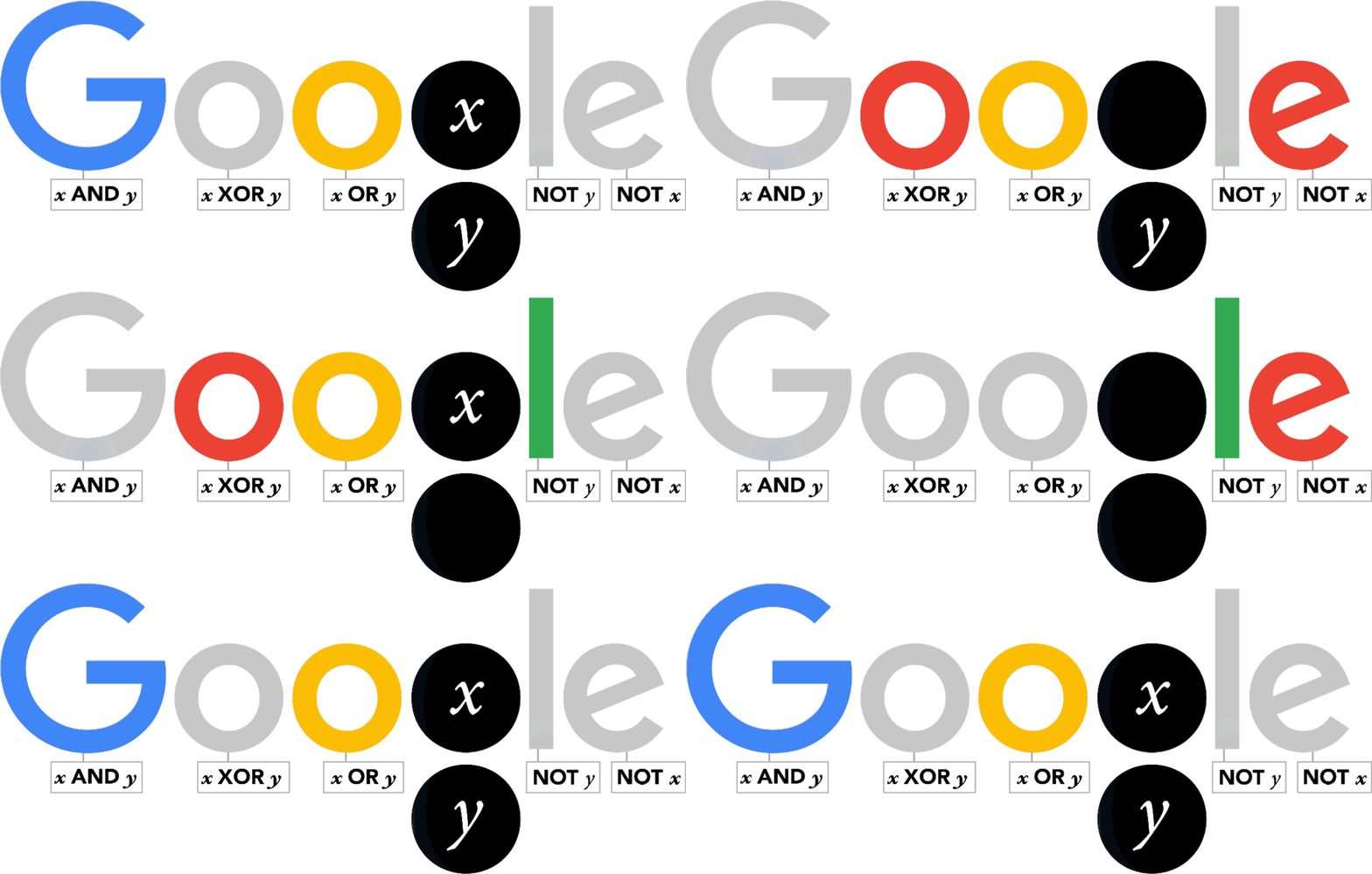
As one of the most important scientists to have ever worked in Ireland, Boole effectively laid the foundations of the entire Information Age while working from UCC. So it’s fair to say that without George Boole, there’d be no Google! So, as a tribute to Boole’s contributions, artist Leon Hong created today’s doodle, which cycles through all the ANDs, ORs, NOTs, and even XORs of the Boolean states for two discrete variables.

A very happy 11001000th birthday to genius George Boole!


}, 10);